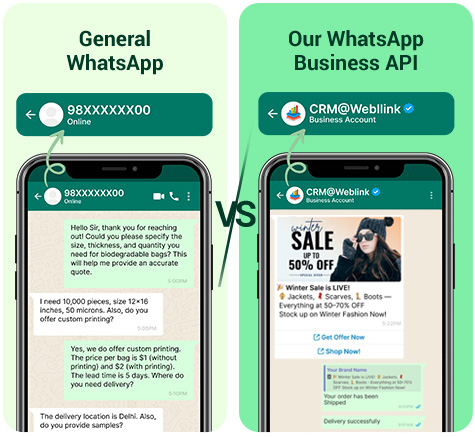



With a 98% open rate and 70% click rate, WhatsApp is the ultimate tool for impactful communication.
Key Features ![]()
Instantly respond to customer queries.
Keep clients updated on order status and shipping.
Automate meeting or reservation alerts.
Send personalized offers and promotions.
Confirm payments, renewals, and more.
Use your brand name for consistent communication.
Key Features ![]()
Reinforce your identity across all customer touchpoints.
Customers engage more with recognized brands.
Elevate your business with formal, branded messaging.
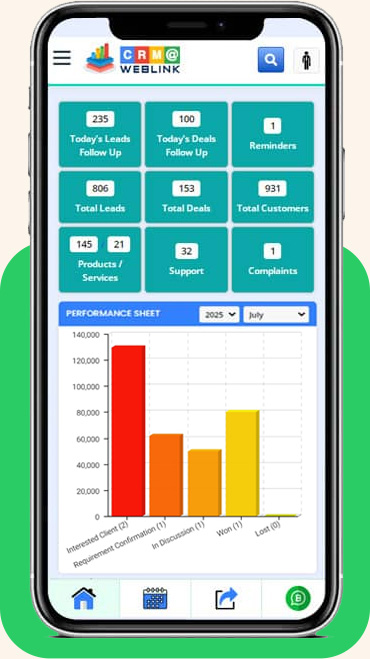
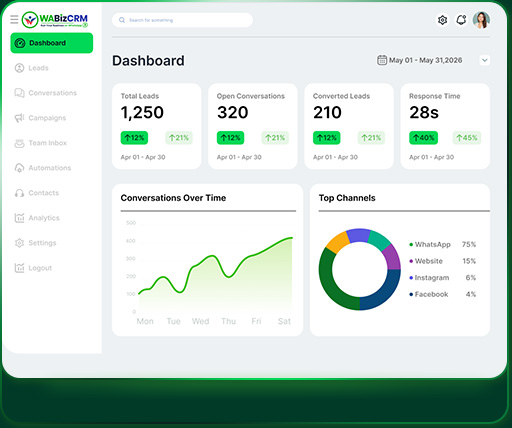
Seamlessly connect WhatsApp with advanced CRM software to optimize client management, boost sales efficiency, and automate workflows like never before!
Capture leads from Facebook, Instamart, B2B portals and more — all in one place!
Track every lead through all sales stages — from inquiry to conversion.
Simplify invoicing, automate billing, and reduce manual errors.
Automate follow-ups and reminders—never miss an update.
Track queries, resolve complaints faster, and increase customer satisfaction.
Get real-time insights into your business with powerful analytics.
When you combine the power of WhatsApp Business API with CRM@Weblink, you get double the impact: faster communication, smarter workflows, and happier customers. It’s the ultimate solution to grow your business!
Mandatory Requirements for WhatsApp Business API
Step 1: WABA Without Brand Name (Limit: 250 Messages/Day)
Step 2: WABA–CRM Integration & Training
Step 3: Brand Name Approval Process
Note:
AND, additional Mandatory Requirements:
Step 4: Mobile number proof of the number updated in the FBM Portfolio (e.g., phone bill or any company document displaying that mobile number). It is mandatory for International Customers but in some cases Meta may ask from India Customer’s too.
Step 5: A functional website with SSL is required, including a Products/Services page and a Contact Us page with the same address as in FBM/documents. If the brand name (required for WhatsApp display) differs from the legal business name in FBM/documents, display the brand name in the website header and the legal business name in the footer along with the rights reserved statement (like: Copyright © legal company name. All Rights Reserved), as shown in the example below.
Example: https://weblink.in/, Brand – CRM@Weblink | Legal Name – Weblink.In Pvt. Ltd.
Header: CRM@Weblink
Footer: © Copyrights Weblink.In Pvt. Ltd. 1997. All rights reserved
Step 6: A mobile number for WABA activation: The number must not be linked to any existing WhatsApp account and should be able to receive an OTP via SMS or voice call.
Mandatory Documents Required:
Step 1: Company’s registration or incorporation documents.
OR,
Step 2: Tax registration certificate (e.g., GST, VAT Certificate etc)
OR,
Step 3: Recent current account bank statement
Note:
Step 4: Mobile number proof of the number updated in the FBM Portfolio (e.g., phone bill or any company document displaying that mobile number). It is mandatory for International Customers but in some cases Meta may ask from India Customer’s too.
Step 5: A functional website with SSL is required, including a Products/Services page and a Contact Us page with the same address as in FBM/documents. If the brand name (required for WhatsApp display) differs from the legal business name in FBM/documents, display the brand name in the website header and the legal business name in the footer along with the rights reserved statement (like: Copyright © legal company name. All Rights Reserved), as shown in the example below.
Example: https://weblink.in/, Brand – CRM@Weblink | Legal Name– Weblink.In Pvt. Ltd.
Header: CRM@Weblink
Footer: © Copyrights Weblink.In Pvt. Ltd. 1997. All rights reserved
Step 6: A mobile number for WABA activation: The number must not be linked to any existing WhatsApp account and should be able to receive an OTP via SMS or voice call.